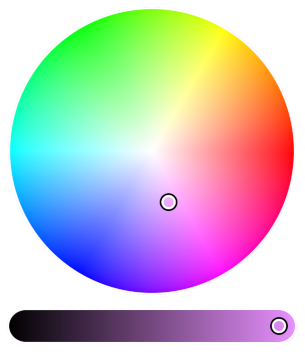
<h1 align="center"><a href="//iro.js.org" target="blank"><img height="340" src="https://raw.githubusercontent.com/jaames/iro.js/master/assets/screenshot.png"/><br/>iro.js</a></h1>

<p align="center">
  <b>Modular, design-conscious color picker widget for JavaScript - with support for a bunch of color formats | <a href="//iro.js.org" target="blank">iro.js.org</a></b>
</p>

<p align="center">
  <a href="https://github.com/jaames/iro.js/blob/master/LICENSE.txt">
    <img src="https://badgen.net/github/license/jaames/iro.js?color=BB5FD1" alt="license" />
  </a>
  <a href="https://npmjs.org/package/@jaames/iro">
    <img src="https://badgen.net/npm/v/@jaames/iro?color=6C8FF2" alt="version" />
  </a>
  <a href="https://npmjs.org/package/@jaames/iro">
    <img src="https://badgen.net/npm/dt/@jaames/iro?color=6AD4E0" alt="downloads" />
  </a>
  <a href="https://bundlephobia.com/result?p=@jaames/iro">
    <img src="https://badgen.net/bundlephobia/minzip/@jaames/iro?color=6FDF89" alt="minzip size" />
  </a>
  <a href="">
    <img src="https://badgen.net/badge/jQuery/none/F8AE55" alt="no jQuery" />
  </a>
</p>

<p align="center">
  <a href="#features">Features</a> | <a href="#demo">Demo</a> | <a href="#installation">Installation</a> | <a href="#usage">Usage</a> | <a href="#plugins">Plugins</a> | <a href="https://iro.js.org/guide.html">Documentation</a> | <a href="#special-thanks">Special Thanks</a> | <a href="https://github.com/jaames/iro.js/discussions">Forum</a>
</p>

<br/>

## Features

 * Work with colors in hex, RGB, HSV and HSL formats (plus kelvin temperatures!) in one simple, frictionless API
 * Add multiple colors to the same color picker for selecting color harmonies and themes
 * Create the perfect color picker from a selection of pre-built UI components
 * All of iro.js can run from a single script - no extra CSS, images, or third-party libraries required!
 * [~9kb](https://bundlephobia.com/result?p=@jaames/iro) minified and gzipped
 * Licenced under MPL 2.0 - 100% free for personal and commercial use

<img height="16" height="888" src="https://raw.githubusercontent.com/jaames/iro.js/master/assets/break.png"/>

## Codepen Demos

 * [Basic introduction](https://codepen.io/rakujira/pen/WZOeNq)
 * [Multicolor](https://codepen.io/rakujira/pen/bGddRyq)
 * [Components / alternate layouts](https://codepen.io/rakujira/pen/XWbgwYm)
 * [Custom handle SVGs](https://codepen.io/rakujira/pen/vbeENp)

<img height="16" height="888" src="https://raw.githubusercontent.com/jaames/iro.js/master/assets/break.png"/>

## Installation

### Install with NPM

<!-- MARKDOWN-AUTO-DOCS:START (CODE:src=./examples/readme/install.sh) -->
<!-- The below code snippet is automatically added from ./examples/readme/install.sh -->
```sh
npm install @jaames/iro --save
```
<!-- MARKDOWN-AUTO-DOCS:END -->

If you are using a module bundler like Webpack or Rollup, import iro.js into your project: 
<!-- MARKDOWN-AUTO-DOCS:START (CODE:src=./examples/readme/install.js) -->
<!-- The below code snippet is automatically added from ./examples/readme/install.js -->
```js
// Using ES6 module syntax
import iro from '@jaames/iro';

// Using CommonJS modules
const iro = require('@jaames/iro');
```
<!-- MARKDOWN-AUTO-DOCS:END -->

### Using the jsDelivr CDN

<!-- MARKDOWN-AUTO-DOCS:START (CODE:src=./examples/readme/install.html) -->
<!-- The below code snippet is automatically added from ./examples/readme/install.html -->
```html
<script src="https://cdn.jsdelivr.net/npm/@jaames/iro@5"></script>
```
<!-- MARKDOWN-AUTO-DOCS:END -->

When you manually include the library like this, iro.js will be made globally available on window.iro.

### Download and host yourself

**[Development version](https://raw.githubusercontent.com/jaames/iro.js/master/dist/iro.js)**<br/>
Uncompressed, with source comments included. Intended for debugging.

**[Production version](https://raw.githubusercontent.com/jaames/iro.js/master/dist/iro.min.js)**<br/>
Minified and optimized version.

Then add it to the `<head>` of your page with a `<script>` tag:

```html
<html>
  <head>
    <!-- ... -->
    <script src="./path/to/iro.min.js"></script>
  </head>
  <!-- ... -->
</html>
```

<img height="16" height="888" src="https://raw.githubusercontent.com/jaames/iro.js/master/assets/break.png"/>

## Usage

### Getting Started

First, we need a HTML element with a unique identifier (like an `id` attribute) to act as a container for the color picker:

```html
<div id="picker"></div>
```

Then use JavaScript to create a new iro.ColorPicker with a CSS selector that matches your container element:

```js
var colorPicker = new iro.ColorPicker('#picker');
```

You can also use a DOM object instead of a CSS selector here -- this might be more suitable if you're integrating iro.js into an application built with a framework such as Vue, React, etc.

<img height="16" height="888" src="https://raw.githubusercontent.com/jaames/iro.js/master/assets/break.png"/>

## Color Picker Options

The color picker can be customized by passing a set of options to the second `iro.ColorPicker` parameter:

<!-- MARKDOWN-AUTO-DOCS:START (CODE:src=./examples/readme/colorPickerOptions.js) -->
<!-- The below code snippet is automatically added from ./examples/readme/colorPickerOptions.js -->
```js
var colorPicker = new iro.ColorPicker("#picker", {
    // Set the size of the color picker
    width: 320,
    // Set the initial color to pure red
    color: "#f00"
});
```
<!-- MARKDOWN-AUTO-DOCS:END -->

### Available Options

<!-- MARKDOWN-AUTO-DOCS:START (JSON_TO_HTML_TABLE:src=./examples/readme/availableOptions.json) -->
<table class="JSON-TO-HTML-TABLE"><thead><tr><th class="option-th">Option</th><th class="purpose-th">Purpose</th><th class="default-value-th">Default Value</th></tr></thead><tbody ><tr ><td class="option-td td_text"><code>width</code></td><td class="purpose-td td_text">Total width of the control UI.</td><td class="default-value-td td_text"><code>300</code></td></tr>
<tr ><td class="option-td td_text"><code>color</code></td><td class="purpose-td td_text">The initial color value. This can be any [supported color format](https://iro.js.org/color_api.html#supported-color-formats).</td><td class="default-value-td td_text"><code>#ffffff</code></td></tr>
<tr ><td class="option-td td_text"><code>colors</code></td><td class="purpose-td td_text">Initial color values used for [multi-color selections](https://iro.js.org/advanced.html#multi-color-selections).</td><td class="default-value-td td_text">null</td></tr>
<tr ><td class="option-td td_text"><code>display</code></td><td class="purpose-td td_text">CSS display value for the color picker root element.</td><td class="default-value-td td_text"><code>block</code></td></tr>
<tr ><td class="option-td td_text"><code>id</code></td><td class="purpose-td td_text">HTML ID for the color picker root element.</td><td class="default-value-td td_text"><code>null</code></td></tr>
<tr ><td class="option-td td_text"><code>layout</code></td><td class="purpose-td td_text">Used for customising the [UI component layout](https://iro.js.org/advanced.html#custom-ui-layouts).</td><td class="default-value-td td_text"><code>null</code></td></tr>
<tr ><td class="option-td td_text"><code>layoutDirection</code></td><td class="purpose-td td_text">UI component stacking direction; either <code>vertical</code> or <code>horizontal</code>.</td><td class="default-value-td td_text"><code>vertical</code></td></tr>
<tr ><td class="option-td td_text"><code>padding</code></td><td class="purpose-td td_text">Padding around the control handles.</td><td class="default-value-td td_text"><code>6</code></td></tr>
<tr ><td class="option-td td_text"><code>margin</code></td><td class="purpose-td td_text">Gap between individual components.</td><td class="default-value-td td_text"><code>12</code></td></tr>
<tr ><td class="option-td td_text"><code>borderWidth</code></td><td class="purpose-td td_text">Width of the border around the controls. Set to <code>0</code> for no border.</td><td class="default-value-td td_text"><code>0</code></td></tr>
<tr ><td class="option-td td_text"><code>borderColor</code></td><td class="purpose-td td_text">Color of the border. Any valid CSS color is supported.</td><td class="default-value-td td_text"><code>#ffffff</code></td></tr>
<tr ><td class="option-td td_text"><code>handleRadius</code></td><td class="purpose-td td_text">Radius of the control handles.</td><td class="default-value-td td_text"><code>8</code></td></tr>
<tr ><td class="option-td td_text"><code>handleSvg</code></td><td class="purpose-td td_text">Custom handle SVG, used for [custom handles](https://iro.js.org/advanced.html#custom-handles).</td><td class="default-value-td td_text"><code>null</code></td></tr>
<tr ><td class="option-td td_text"><code>handleProps</code></td><td class="purpose-td td_text">Custom handle properties, used for [custom handles](https://iro.js.org/advanced.html#custom-handles).</td><td class="default-value-td td_text"><code>{x:0, y:0}</code></td></tr>
<tr ><td class="option-td td_text"><code>wheelLightness</code></td><td class="purpose-td td_text">If set to <code>false</code>, the color wheel will not fade to black when the lightness decreases.</td><td class="default-value-td td_text"><code>true</code></td></tr>
<tr ><td class="option-td td_text"><code>wheelAngle</code></td><td class="purpose-td td_text">Starting angle of the color wheel's hue gradient, measured in degrees.</td><td class="default-value-td td_text"><code>0</code></td></tr>
<tr ><td class="option-td td_text"><code>wheelDirection</code></td><td class="purpose-td td_text">Direction of the color wheel's hue gradient; either <code>clockwise</code> or <code>anticlockwise</code>.</td><td class="default-value-td td_text"><code>anticlockwise</code></td></tr>
<tr ><td class="option-td td_text"><code>sliderSize</code></td><td class="purpose-td td_text">Slider control size. By default this will be calculated automatically.</td><td class="default-value-td td_text"><code>undefined</code></td></tr>
<tr ><td class="option-td td_text"><code>boxHeight</code></td><td class="purpose-td td_text">Box control height. By default this will be the same as the <code>width</code>.</td><td class="default-value-td td_text"><code>undefined</code></td></tr></tbody></table>
<!-- MARKDOWN-AUTO-DOCS:END -->

More details about color picker options, properties, and methods can be found on the [colorPicker API documentation](https://iro.js.org/colorPicker_api.html).

<img height="16" height="888" src="https://raw.githubusercontent.com/jaames/iro.js/master/assets/break.png"/>

## Working with Colors

Each color picker has a `color` object which stores the currently selected color. This color object is tied to the color picker, so any changes to its values will be reflected by the picker, and vice versa.

### Color Properties

The color object has some "magic" properties which can be used to both **get** and **set** the selected color in different formats. Whenever one of these properties is set, the color picker controls will update and the [`color:change`](#color-picker-events) event will fire.

For example, to get the current color as a hex string:

```js
var hex = colorPicker.color.hexString;
console.log(hex); // hex = "#ff0000"
```

Or to set the selected color from a hsl object:

```js
colorPicker.color.hsl = { h: 180, s: 100, l: 50 };
// Color picker updates to match hsl(180, 100, 50)
```

The color object has properties which cover all of the most common web color formats (HEX, RGB, HSL and HSV), as well as some extras:

<!-- MARKDOWN-AUTO-DOCS:START (JSON_TO_HTML_TABLE:src=./examples/readme/colorProperties.json) -->
<table class="JSON-TO-HTML-TABLE"><thead><tr><th class="property-th">Property</th><th class="example-format-th">Example Format</th></tr></thead><tbody ><tr ><td class="property-td td_text"><code>hexString</code></td><td class="example-format-td td_text"><code>#ff0000</code></td></tr>
<tr ><td class="property-td td_text"><code>hex8String</code></td><td class="example-format-td td_text"><code>#ff0000ff</code></td></tr>
<tr ><td class="property-td td_text"><code>rgb</code></td><td class="example-format-td td_text"><code>{ r: 255, g: 0, b: 0 }</code></td></tr>
<tr ><td class="property-td td_text"><code>rgba</code></td><td class="example-format-td td_text"><code>{ r: 255, g: 0, b: 0, a: 1 }</code></td></tr>
<tr ><td class="property-td td_text"><code>rgbString</code></td><td class="example-format-td td_text"><code>rgb(255, 0, 0)</code></td></tr>
<tr ><td class="property-td td_text"><code>rgbaString</code></td><td class="example-format-td td_text"><code>rgb(255, 0, 0, 1)</code></td></tr>
<tr ><td class="property-td td_text"><code>hsl</code></td><td class="example-format-td td_text"><code>{ h: 360, s: 100, l: 50 }</code></td></tr>
<tr ><td class="property-td td_text"><code>hsla</code></td><td class="example-format-td td_text"><code>{ h: 360, s: 100, l: 50, a: 1 }</code></td></tr>
<tr ><td class="property-td td_text"><code>hslString</code></td><td class="example-format-td td_text"><code>hsl(360, 100%, 50%)</code></td></tr>
<tr ><td class="property-td td_text"><code>hslaString</code></td><td class="example-format-td td_text"><code>hsla(360, 100%, 50%, 1)</code></td></tr>
<tr ><td class="property-td td_text"><code>hsv</code></td><td class="example-format-td td_text"><code>{ h: 360, s: 100, v: 100 }</code></td></tr>
<tr ><td class="property-td td_text"><code>hsva</code></td><td class="example-format-td td_text"><code>{ h: 360, s: 100, v: 100, a: 1 }</code></td></tr>
<tr ><td class="property-td td_text"><code>red</code></td><td class="example-format-td td_text"><code>0</code> to <code>255</code></td></tr>
<tr ><td class="property-td td_text"><code>green</code></td><td class="example-format-td td_text"><code>0</code> to <code>255</code></td></tr>
<tr ><td class="property-td td_text"><code>blue</code></td><td class="example-format-td td_text"><code>0</code> to <code>255</code></td></tr>
<tr ><td class="property-td td_text"><code>alpha</code></td><td class="example-format-td td_text"><code>0</code> to <code>1</code></td></tr>
<tr ><td class="property-td td_text"><code>hue</code></td><td class="example-format-td td_text"><code>0</code> to <code>360</code></td></tr>
<tr ><td class="property-td td_text"><code>saturation</code></td><td class="example-format-td td_text"><code>0</code> to <code>100</code></td></tr>
<tr ><td class="property-td td_text"><code>value</code></td><td class="example-format-td td_text"><code>0</code> to <code>100</code></td></tr>
<tr ><td class="property-td td_text"><code>kelvin</code></td><td class="example-format-td td_text"><code>1000</code> to <code>40000</code></td></tr></tbody></table>
<!-- MARKDOWN-AUTO-DOCS:END -->

For more details about color objects, check out the [Color API documentation](https://iro.js.org/color_api.html).

<img height="16" height="888" src="https://raw.githubusercontent.com/jaames/iro.js/master/assets/break.png"/>

## Color Picker Events

Events let you to run your own code after certain things have happened, like when the selected color has changed or when the user has interacted with the color picker.

The color picker's [`on`](https://iro.js.org/colorPicker_api.html#on) method can be used to attach functions that will be called whenever a particular event is fired. In this example, we add a listener for the `color:change` event:

<!-- MARKDOWN-AUTO-DOCS:START (CODE:src=./examples/readme/colorPickerEventsExample1.js) -->
<!-- The below code snippet is automatically added from ./examples/readme/colorPickerEventsExample1.js -->
```js
// listen to a color picker's color:change event
// color:change callbacks receive the current color
colorPicker.on('color:change', function(color) {
    // log the current color as a HEX string
    console.log(color.hexString);
});
```
<!-- MARKDOWN-AUTO-DOCS:END -->

The [`on`](https://iro.js.org/colorPicker_api.html#on) method can also take an array of event names, in case you want to listen to multiple events with one function:

<!-- MARKDOWN-AUTO-DOCS:START (CODE:src=./examples/readme/colorPickerEventsExample2.js) -->
<!-- The below code snippet is automatically added from ./examples/readme/colorPickerEventsExample2.js -->
```js
// listen to a color picker's color:init and color:change events
colorPicker.on(['color:init', 'color:change'], function(color) {
    // log the current color as a HEX string
    console.log(color.hexString);
});
```
<!-- MARKDOWN-AUTO-DOCS:END -->

Event listeners can also be removed at any time by passing the same function to the color picker's [`off`](https://iro.js.org/colorPicker_api.html#off) method:

<!-- MARKDOWN-AUTO-DOCS:START (CODE:src=./examples/readme/colorPickerEventsExample3.js) -->
<!-- The below code snippet is automatically added from ./examples/readme/colorPickerEventsExample3.js -->
```js
// create a callback function
function onColorChange(color) {
    console.log(color.hexString);
}
  
// add color:change listener
colorPicker.on('color:change', onColorChange);
  
// later, if we want to stop listening to color:change...
colorPicker.off('color:change', onColorChange);
```
<!-- MARKDOWN-AUTO-DOCS:END -->

### Available Events

##### `color:change`

Fired whenever the selected color changes -- either when the user interacts with the color picker, or when the color is updated by your own code. This event's callback functions will recieve two values:

* `color`: the [currently selected color](#working-with-colors)
* `changes`: an object showing which HSV channels have changed since the last time the event was fired

It is safe to modify the `color` object within callbacks for this event. This can be helpful if you want to limit the range or a certain color channel, for example:

<!-- MARKDOWN-AUTO-DOCS:START (CODE:src=./examples/readme/colorChange.js) -->
<!-- The below code snippet is automatically added from ./examples/readme/colorChange.js -->
```js
colorPicker.on('color:change', function(color) {
    // don't let the color saturation fall below 50!
    if (color.saturation < 50) {
      color.saturation = 50;
    }
});
```
<!-- MARKDOWN-AUTO-DOCS:END -->

##### `input:change`

Similar to `color:change`, except this event is only fired when the color is changed with the user's **mouse or touch input**. 

Callbacks for this event recieve the same values as `color:change`, and it is also safe to modify the `color` object within callbacks for this event.

##### `input:start`

Fired whenever the users starts interacting with the color picker controls. The [currently selected color](#working-with-colors) is passed to this event's callback function.

##### `input:move`

Fired when the user moves their pointer/mouse after beginning interaction. The [currently selected color](#working-with-colors) is passed to this event's callback function.

##### `input:end`

Fired whenever the user stops interacting with the color picker controls. The [currently selected color](#working-with-colors) is passed to this event's callback function.

##### `color:init`

Fired whenever a color is added. This event's callbacks will recieve the newly added color object.

##### `color:remove`

Fired when a color is removed from the color picker. This event's callbacks will receive the removed color object.

##### `color:setActive`

Fired whenever the 'active' color is switched. This event's callbacks will receive the active color object.

##### `mount`

Fired when the colorPicker's UI has been mounted to the DOM and is ready for user interaction. The colorPicker object is passed to this event's callback function.

<img height="16" height="888" src="https://raw.githubusercontent.com/jaames/iro.js/master/assets/break.png"/>

## Special Thanks

Thank you to the following people for their support and contributions!

- @KaanMol and @mksglu for starting the Typescript port
- @asonix for vertical slider implementation

**Sponsored by [Ship Shape](https://shipshape.io)**

<img width="400" src="https://raw.githubusercontent.com/jaames/iro.js/master/assets/sponsor_shipshape.png">

<img height="16" height="888" src="https://raw.githubusercontent.com/jaames/iro.js/master/assets/break.png"/>

[Website](//iro.js.org) |  [Forum](https://github.com/jaames/iro.js/discussions) | [Codepen Demo](//codepen.io/rakujira/pen/WZOeNq?editors=0010) | [Contribution Guide](CONTRIBUTE.md) | [Donate](https://www.paypal.com/cgi-bin/webscr?cmd=_s-xclick&hosted_button_id=XS9R3QTLZYAXQ&source=url) | [Changelog](CHANGELOG.md) | [License](LICENSE.txt)

&copy; [James Daniel](//github.com/jaames)
